
Build the world
behind your token.
Give your community a place to meet the team, experience your project and come back for the next event. Start with a playable plaza. Build toward a launch that rewards participation.
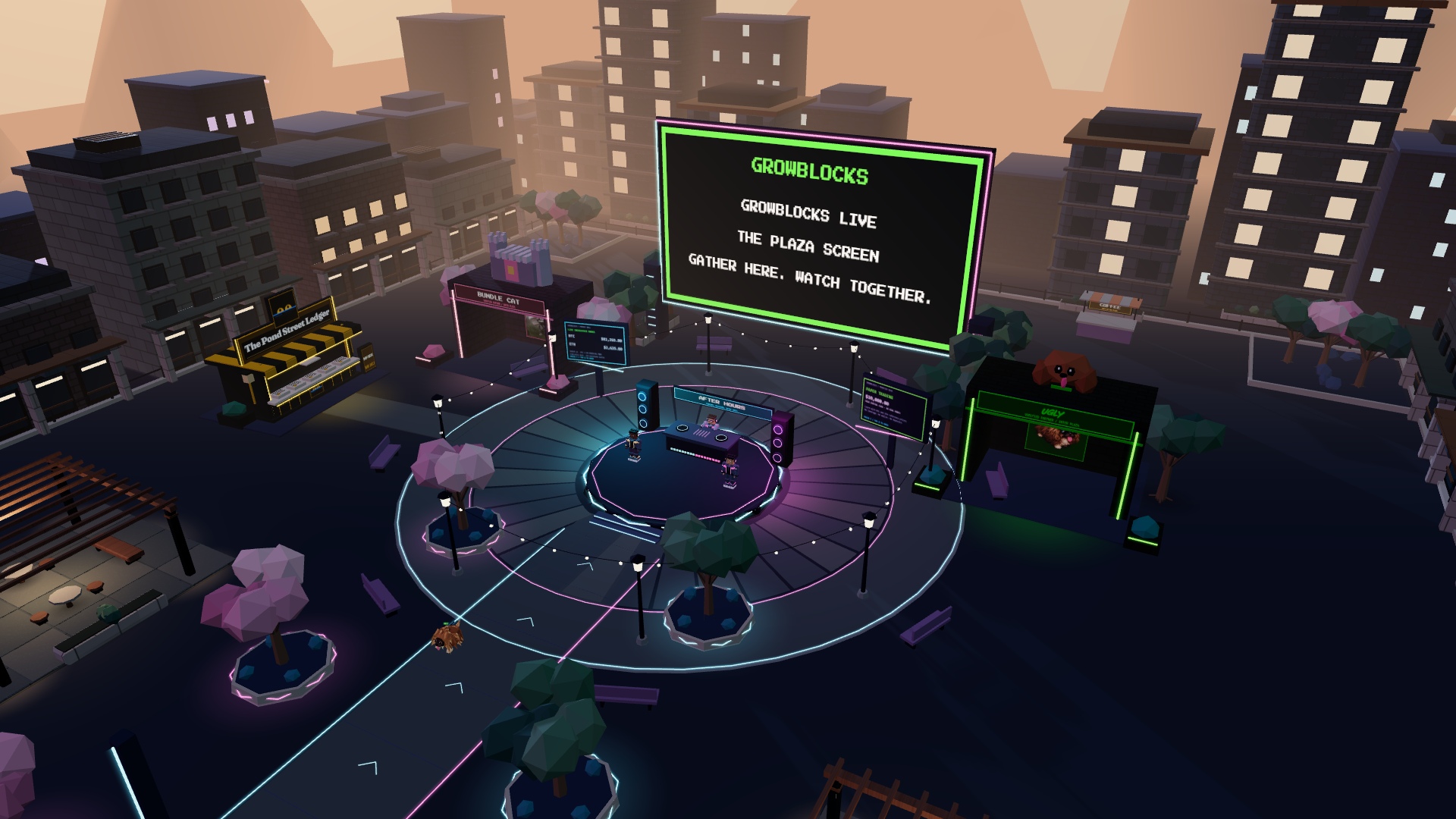
Your community, somewhere together.
GrowBlocks brings community spaces, creator tools and market discovery into a browser game. Project owners build in Studio; players meet in the worlds they publish. You do not need to write game code to create a plaza.
A world can be a launch venue, a weekly community hangout, a branded exhibition or the place where you introduce your next release. Use events and useful participation to give people a reason to return.
Publishing gives you a playable destination to share. A stand in the main GrowBlocks Plaza is curated separately; publication does not automatically grant placement, verification or an audience.
Build your first plaza Available
- Open Studio and sign in with Google. Your account owns cloud drafts and publications. A public nickname does not change permissions.
- Browse Templates. Start a separate world with Create new world. Use landscape only keeps your buildings; Replace layout changes the current draft while keeping its identity and access rules. Save or export a backup before replacing work.
- Build and play-test. Overview, Element library, Canvas and Properties switch workspace views. Add buildings, trees, a stage and screens, then use Play test to check movement. Local preview does not test admission rules.
- Prepare your homepage listing. In Properties → Plaza, upload a project logo and click the cover preview’s add-image icon to add a plaza cover. You can Capture current plaza view instead of uploading a cover. Both are required for Go live; the card preview shows how they will appear.
- Choose who can enter. Open Access. Leave Everyone, or pick Holders of my plaza coin, Holders of another token or Invited wallets only; when the plaza has a coin, choose what happens around the launch. Access saves a private cloud draft when needed. Save access applies the rule separately from scene publishing.
- Save draft, then Share test. Share test publishes an unlisted snapshot. Its link still enforces your access rules. Use a separate player account to test both eligible and ineligible entry.
- Go live. Publish when ready to appear in Community worlds on the homepage. The result dialog provides a short permanent link, a branded preview card, Enter plaza, Copy link and Telegram/X share buttons. The link remains near the top of Studio. Later draft edits require another publication.
Build with an AI agent Free
A plaza is one JSON document, so an agent such as Claude can write it directly: elements, styles, rules, the project description, X and Telegram links. The growblocks-world skill in the repo (skills/growblocks-world/) has the full schema, two example scenes and a validator (node scripts/validate-world.mjs your-plaza.json) that runs the exact rules Studio enforces. The agent hands you the file; you still sign in, review it in Play test, upload the listing logo and cover, and press Go live yourself — building is free and unrestricted, only the launch transaction ever needs your wallet. Developer keys and a publish API for agents to push changes directly are proposed, not shipped yet.
Before inviting players
Check the entrance, stage, mobile movement, screen media and saved access rule. Confirm an invited holder can enter and an uninvited or underfunded test wallet cannot. Owners can edit drafts without satisfying a gate, but have no bypass when entering the published world as a player.
Worlds & branding Available
Start with a themed environment and combine library elements to make it yours. Explore neon festival spaces, Japanese-inspired gardens, tropical settings, forest, desert and orbital themes, plus stadium-style gathering spaces. Studio's world picker contains the current collection.
Build around the gathering
Use a clear route from the spawn area to your central stage. Put screens where the crowd can see them. Place smaller branded displays, props and social corners around the edge so the centre stays usable.
Invite your community
Publish a custom world to get a permanent /p/… link and a 1200 × 630 preview using your plaza cover, project logo and world name. Share on Telegram and Post on X open a draft for you to send. Existing worlds get their short link when published again. Republish to update the card; the short address stays the same.
Artwork and the world name are public even for token-gated and unlisted test worlds. The link opens the normal entrance with all access checks. Unpublishing disables the destination; Telegram or X may retain an older preview in their cache. Sharing does not verify project identity. If card creation fails, your published full link still works and Retry share card lets you try again.
Required homepage artwork
Every new or updated live Studio publication needs a project logo and plaza cover. Upload PNG, JPEG or WebP files up to 10 MB. Studio fits the logo into a 256 × 256 square and crops the cover to 768 × 432 (16:9). Orbit the canvas before using Capture current plaza view. Use artwork you own or have permission to publish.
The listing images are separate from in-world screen artwork. They remain public even when the plaza is gated. Private drafts and unlisted tests can be unfinished; existing listings retain their fallback until their next live publication. Uploading a logo does not verify a project.
Brand the space
Use your own logo and images on display surfaces, then carry the same palette into your scenery. Landscape and lighting controls change the atmosphere; they do not require replacing every building. Mix elements across styles when it helps the world feel like your project.
Visit UGLY (testnet holder gate) and Bundle Cat for examples of custom community venues. These curated worlds are examples, not a promise that every bespoke structure is a one-click template.
For GrowBlocks logos, fonts, colours and social templates, use the brand kit and post editor.
Studio: elements & editing Available
Studio is a full 3D editor in the browser. A plaza holds up to 200 elements on a 48, 64 or 96 metre plot. Every element can be moved on all three axes, rotated, scaled, recoloured, given a surface finish, labelled, grouped and locked. Nothing here needs code.
The Element library
- Build: Wall, Floor slab, Block, Pillar, Ramp, Stairs, Sphere and Sign board. These are primitives with editable width, height and depth from 5 cm to 40 m, so you can build anything from a doorstep to a skyscraper. Ramps and stairs are walkable.
- Play: Spawn point, Teleport pad, Jump pad, Door, Trigger zone and Sound zone. See Play elements.
- Terrain: Hill, Ridge, Mesa, Crater, Boulders, Pool, Ground paint, Grass patch and Light orb. See Terrain, lighting & sound.
- Party, Buildings, Nature, Lights, Props, Characters, Community and Screens: themed set pieces from every landscape style. Mix them freely. Every populated template includes a Voting kiosk.
- My prefabs: select several elements and choose Save as prefab. The group appears in the library for this browser and drops back in as one piece. Shift+click a prefab tile to remove it.
Customise any element
The Properties panel shows label or sign text, position, rotation, elevation, size, scale, colour, palette swatches, finish and a floating label switch. Sign boards take two lines; write | where the line should break. Finishes are wood, stone, metal, glass, brick, plaster and glow. Save up to eight palette colours per plaza and recolour every element that shares a tint in one click.
Edit pieces takes a themed prop apart into primitive parts and opens it in the 3D workbench, so a teahouse can become the start of your own building. The rebuilt object replaces the original element.
Selection, moving and stacking
Click selects, Shift+click adds to the selection, Shift+drag on empty ground box-selects and Ctrl+A selects everything. Drag to move, Alt+drag to raise or lower, Ctrl+drag to rotate in 15° steps. Arrow keys nudge by the snap step (1, 0.5 or 0.25 m, or off) and Shift makes it five times larger. With Stack on surfaces on, a moved element drops onto whatever is beneath it, so a lantern lands on a wall instead of inside it.
| Keys | Action |
|---|---|
| Ctrl+C / Ctrl+X / Ctrl+V | Copy, cut, paste beside the original |
| Ctrl+D | Duplicate |
| Ctrl+G / Ctrl+Shift+G | Group / ungroup |
| Ctrl+L | Lock or unlock in place (a padlock marks locked elements) |
| Page Up / Page Down | Raise or lower by half a metre |
| R / Shift+R | Rotate 15° / 45° |
| Delete | Delete the selection |
| Ctrl+Z / Ctrl+Y | Undo / redo |
| Ctrl+S | Save draft |
| Esc | Clear the selection |
The Keys button under the canvas shows the same list inside Studio.
Plot size
Choose 48 × 48 m (classic), 64 × 64 m or 96 × 96 m in Properties → Plaza. The grid, ground plate, edge lines and walkable area follow the plot, and on project pages the island and lawn grow with it. Shrinking a plot pulls elements back inside the new edge.
Limits: 200 elements, scale from 0.25× to 6×, elevation up to 24 m, eight light orbs, eight palette colours, eight image assets and eight custom model definitions per plaza. Saved scenes stay under 600 KB.
Play elements, gravity & rules Available
Play elements turn a scene into a place with things to do. They behave the same in Play test and in the published plaza.
| Element | What it does |
|---|---|
| Spawn point | Where players start and which way they face. Switch on Intro camera for a three-second sweep down to the player. |
| Teleport pad | Step on it to appear beside the target pad you choose in Properties. Both pads pause for a moment afterwards. |
| Jump pad | Launches the player upward. Power runs from 1 to 3. |
| Door | Slides open when a player comes near and closes behind them. Closed doors block walking, so a wall with a door makes a real room. |
| Trigger zone | Invisible in play. Fires confetti, a chime or a text message when a player enters. |
| Sound zone | Invisible in play. Birds, water, crowd, fire, wind or arcade sound with a radius fade. |
Gravity
Set gravity per plaza from 0.2× (moon) to 3× (crushing) in Properties → Plaza. Lower gravity means higher, floatier jumps; combine it with jump pads and stacked platforms for climbing routes. Space jumps in play test and on project pages.
Rules: logic without code
Open Rules in Properties → Plaza and choose Add rule. Each rule is a sentence: when something happens, do something.
- When: play starts, the player enters an element, the player leaves an element, or every N seconds (1 to 300). Any element can be a zone; trigger zones are the natural choice because they are invisible.
- Then: show, hide or toggle an element; open or close a door; send the player to a portal pad; show a message; play a chime; confetti at an element; set gravity; set the time of day.
- Only once per visit makes the rule fire a single time.
Examples: enter the entrance zone → open the vault door. Leave the stage → hide the backstage wall. Every 30 seconds → confetti at the fountain. Play starts → show a welcome message. Hidden elements stop blocking and carrying the player, so a hidden bridge is really gone. Up to 24 rules per plaza; stopping play test resets everything to the saved state.
A rule that points at a deleted element stops the plaza from saving until you retarget or remove it. Doors held open by a rule stay open until another rule closes them or the visit ends.
Terrain, lighting & sound Available
Shape the ground
Hills, ridges, mesas and craters are walkable: players climb them and stand on top. Boulders and pools block the way. Ground paint recolours an area of the floor. Grass patches grow real swaying grass that bends around players, with the patch colour setting the shade and two sliders for density and blade height, from a trimmed lawn to a tall meadow. A patch can sit on any surface, including walls and hills. Size each piece with width, height and depth, and stack terrain to build valleys and plateaus.
Time of day and fog
Leave time of day on the live clock or fix it anywhere between night and noon. Fog controls how far the distance fades. Both are in Properties → Plaza and apply on top of any landscape style, so a candy world can be a candy world at midnight. Light orbs are placeable point lights with adjustable brightness; up to eight per plaza, in any colour.
Sound
Choose a world sound bed (nature, ocean, city or space) and place sound zones for local sources. Everything is synthesised in the browser, so there is nothing to license and nothing to upload. Players switch sound on with the Sound button in play test and on project pages; browsers block audio until the visitor taps something.
Licensed music tracks and uploaded audio files are not supported. Use screens for hosted video with sound.
Team editing Available
Build one plaza with several people at once. The owner saves a cloud draft, opens Team in Properties → Plaza, adds up to eight teammates by the email of their Google account and shares the team link. Teammates sign in with that account and the same draft opens in their Studio.
- Auto-save: on a team draft every change saves about a second after you make it. Save draft still works.
- Live sync: each saved version streams into every open editor. If two people save at the same moment the later save wins and the status bar tells the other editor to redo their last change.
- Presence: a floating name marker shows where each teammate is working and which element they have selected. The bar above the canvas lists who is editing.
- Roles: teammates edit the scene. Only the owner manages the team, publishes, shares test links, changes access rules or deletes the draft. Teammates cannot see the owner’s other drafts.
Team links only work for the listed accounts. Remove a teammate and their link stops working at the next save. Partner plazas (UGLY, Bundle Cat, Pond Street) keep their separate partner access.
Player access Robinhood Testnet pilot
Owners decide who can enter their published plaza. Rules apply to shared test links and live worlds; the editor stays private. They are entry rules, not allocations or trading permissions.
| Who can enter? | What a player needs |
|---|---|
| Everyone | Nothing. Chat and multiplayer keep their own Google sign-in. |
| Holders of my plaza coin | At least the minimum of the coin this plaza launched, in their game wallet. Until the coin has launched and met its minimum raise the plaza stays closed. |
| Holders of another token | Your ERC-20, ERC-721 or ERC-1155 requirement on the active chain. For existing projects. |
| Invited wallets only | Their wallet address is on your list of up to 200. No balance required. |
The two holder cards can additionally require an invitation ("Also require an invited wallet").
Around my coin launch
When the plaza has a launch, a second block appears: keep the rule above at all times, closed until my coin launches, then open to everyone (the plaza is listed as coming soon), or closed until my coin launches, then holders of my coin only. The server resolves the rule at entry time from the plaza's newest launch, so the switch happens by itself the moment the launch is finalized. A launch that misses its minimum raise never opens a holder rule.
Which wallet is checked
Every player who signs in with Google gets a game wallet (open Game Wallet once to create it; gas in the plaza is sponsored). Holdings and invitations are checked on that wallet first, so coins bought in the Launch Theater count immediately. A wallet the player verified in the UGLY Lab is checked second. Players never need to connect an external wallet unless they want to use one they already hold.
Invite wallets
- Ask each player for their game wallet address. They find it in Game Wallet after signing in, with a copy button. An external wallet address works if they verified it in the UGLY Lab.
- In Studio open Access, choose Invited wallets only (or a holder card plus "Also require an invited wallet"), paste 1–200 addresses separated by lines, spaces or commas, and Save access. Invalid and zero addresses are rejected; duplicates are merged. The list is private and each save replaces it.
- Share a test link and check the entrance yourself. Saving a rule changes admission of an existing publication without republishing the buildings.
Speak to everyone
Separate from entry, an owner can invite up to 50 wallets as speakers in Studio's Access panel, under "Who can speak to everyone?". The owner can always speak; nobody else can until invited by wallet, the same game-wallet address used for invited entry. A speaker gets two things, scoped to that one plaza only: their microphone plays live to every player there (one speaker on air at a time; going live again refreshes your own broadcast, and the owner can end anyone's broadcast), and the same screen control the owner has in the Broadcast Settings panel, including uploading an image straight from a file. Speaking works in gated plazas too, unlike the "Talk nearby" pilot below, since it is a role the owner grants explicitly rather than something every entrant gets.
Use your own token or NFT
- ERC-20: contract and minimum balance.
- ERC-721: minimum collection count, or one token ID with a minimum of 1 (blank ID = any token in the collection).
- ERC-1155: token ID and minimum quantity.
Only read-only ownership checks are used; players never approve transfers. A contract address does not establish that you represent the official project. Mainnet gates are not enabled yet.
Revocation and privacy
The server checks eligibility on entry and about every eight seconds during play; token observations can be cached for up to ten seconds. Transferring the required coin away or dropping off the list closes access on a later check. Choose Everyone and Save access to reopen. Gating applies to a whole plaza. Voice and Telegram bridging stay off in gated worlds during this pilot. There is no gate subscription, percentage charge or paid pass.
UGLY Lab: try the entry-pass pilot Testnet only
UGLY is the working experimental venue for player identity, token claims and holder-gated entry. The current UGLY plaza requires a verified tester wallet holding at least 1 tUGLY on Robinhood Testnet. tUGLY is a test token, not a mainnet UGLY launch or investment.
- Click the pink UGLY LAB mark at the GrowBlocks entrance, or open UGLY Lab on testnet.
- Sign in with the Google account you will use in the game.
- Open Game Wallet and create your wallet if you do not already have one. Use the verification action to bind it to this account. GrowBlocks prepares the one-use identity message; approve the requested proof. Existing external holders can expand Existing holdings / access in the Lab instead. Identity proof requires no gas or token approval.
- Read and accept the tester-registration terms, then join the tester list.
- If you need a pass, choose Claim 1 tUGLY. Your wallet must approve a Robinhood Testnet transaction and have test ETH for gas. Existing holders can skip claiming.
- Use Enter plaza. The server checks the registered wallet’s actual balance; a claim-success screen alone does not grant entry.
The dispenser allows one claim per wallet address, subject to available supply/refill limits. It is not one claim per person and is not suitable proof of unique-human reward eligibility. Tokens can be transferred; access follows the current balance checks. A custom project whitelist does not automatically collect every visiting player’s address.
Wallet identity proof normally lasts 30 days and can require renewal. Manage membership in the Lab to leave the tester list or remove the wallet binding. Disconnecting a browser extension is different from unlinking the account. Never provide a seed phrase or private key.
This is an explicitly authorized testnet experiment. The previously reported MetaMask domain warning has not been documented as resolved; do not bypass wallet warnings. Mainnet verification remains paused. No real-value trading, custodial balances or mainnet deposits/withdrawals are enabled. The separate test trading pilot uses explicit, bounded token approvals for testnet swaps and NFT sales.
For technical details, see UGLY Lab architecture and the entry-claim implementation.
Game wallets & gas Testnet pilot
Players can explore open worlds with a nickname. The entrance no longer asks for a wallet address. For wallet features, sign in with Google and open Game Wallet. Create it once; returning with the same GrowBlocks account retrieves the same linked wallet. The page shows your address with a copy button: this is the address plaza owners invite and where launch tokens arrive. In the plaza a wallet chip under the GrowBlocks logo shows your total value, the 24-hour change (green or red) and your short address; tap it for every coin you hold with a link to its plaza. ETH and the stable coin are deposit tokens; every other coin was launched from a plaza. Deposit shows the address and the network to send to; Send withdraws any token to another address after a review step (ERC-20 transfers are gas-sponsored, ETH transfers keep a little ETH for gas). One transfer per click, recipient checked for shape, self-send and contract code. Creation, identity verification and tester registration remain explicit actions.
Game Wallet is the default in trading and restricted-entry onboarding. Existing external holdings remain accessible through Existing holdings / access. Changing a nickname does not change wallet ownership, and a pasted address grants no access. Setup returns players to the requesting game page.
Current gas requirements
Testnet claims, approvals and trades currently require test ETH. Use the official Robinhood Testnet faucet with the address actually performing the action. Identity proof and merely receiving tokens do not require the recipient to pay gas. Test tokens have no real value.
Sponsored gas Live on testnet
Game-wallet sends in the plaza and in the Launch Theater are sponsored: claims, bids, finalize, delivery and trades go through with a zero-ETH game wallet. Sponsorship is a platform switch (PRIVY_GAS_SPONSORSHIP), not a creator setting. Browser wallets continue to pay their own gas. If sponsorship fails and the game wallet has test ETH, the current sender can fall back to a direct send with a visible status. There is no creator gas-budget control or unrestricted background trading. Sponsorship covers fees, not tokens spent.
Voting & GrowBlocks XP Community pilot
Give players a decision to gather around. Every populated Studio template now includes a themed Voting kiosk. Existing custom worlds keep their layout: add one from Element library → Community, then publish. Empty plots remain empty. Curated partner worlds get a default kiosk when their saved layout has none.
Start a community poll
- Save your world and choose Share test or Go live. Polls belong to the published world, not the private editor preview.
- Open Voting & XP in Studio, or Plaza settings → Voting & XP in your owned plaza.
- Write a question and 2–6 distinct answers. Choose a duration from 5 minutes to 7 days; leave Start now selected, or schedule a start within the next 7 days.
- Choose signed-in players or verified wallets, and live results or results after closing. Existing plaza gates always apply.
- Start the poll. The form clears and an active-poll card replaces it. Owners can inspect results immediately, End & publish results, Cancel poll, or Edit & restart. Corrections retain the old results and start a fresh ballot; previous voters do not earn XP twice for a correction. Each plaza can create up to six polls per UTC day.
Players sign in with Google, join multiplayer, approach a kiosk and select Vote here. Their answer is final for that poll version. Owners can vote too, but earn no XP in their own plaza. Vote from the published world, not Studio Play test. Reconnecting or changing nickname does not allow another vote. Wallet-required polls also deduplicate the verified wallet; gated plazas enforce both account and wallet uniqueness. There is no voting transaction or gas fee. Telegram-only participation is not supported by this first XP pilot.
Polls and deadlines are shared across sessions, independent of the player roster. Hidden results stay hidden from players until closing; the owner can preview them immediately. Cancellation stops voting and marks the poll cancelled without publishing its tally. Previously earned XP is retained. These are community polls, not on-chain governance or proof of one unique human per vote.
Earn XP by participating
- Voting: 20 XP per accepted vote, capped at 60 XP per UTC day across plazas.
- Active exploration: 1 XP per qualifying active minute, capped at 30 XP per UTC day. Only recent, connected movement samples count; idle sessions and disconnected gaps do not.
- Fair testing: owners earn no XP in their own worlds, and unlisted test worlds award no XP.
- Levels: level 2 starts at 100 XP, level 3 at 400, level 4 at 900. Scores survive reconnects and use the same Google account.
Open the gold XP button for progress, voting and weekly/all-time player rankings. Rankings show the top 20 opted-in players using public nicknames. Players can leave the public ranking without losing their XP. Weeks start Monday UTC.
XP is progression, not a token, trading balance or promise of financial rewards. Cosmetic unlocks, event challenges, return bonuses and plaza discovery rankings are later phases. Movement checks and daily caps limit casual abuse; they do not make browser activity or multiple Google accounts bot-proof.
Token Drops Planned
The proposed system lets a project fund collectible tokens in its plaza: a small rotating coin carries the project logo, and players collect it by walking nearby. The first intended pilot is UGLY with tUGLY on Robinhood Testnet.
Proposed creator workflow
- Select the supported chain and actual token contract, then add the round token logo.
- Fund a reward budget and set the amount per pickup, per-player cap and campaign schedule.
- Place collectibles in Studio or choose safe spawn areas. Preview, start or pause the campaign from Plaza Settings.
- Monitor the remaining budget and delivery status. Collected, awaiting delivery and received must remain distinct.
Initial pickups are intended to be personal allocations, so players do not lose to someone with a faster connection. A server-validated reward ledger would prevent duplicate claims across rooms and reconnects, reserve accepted rewards and deliver them to verified game wallets. Google sign-in alone does not prove a unique human.
These controls, reward contracts and payouts are not built yet. There is no campaign to fund today. The existing UGLY entry-pass claim is a separate fixed faucet, not a general token-distribution builder. A logo alone cannot establish a token’s identity.
Project identity & verification X linking planned
Google sign-in establishes the creator account. It does not establish that the creator represents a particular token or NFT collection. A logo, project name, contract address or typed X username does not grant an official badge. Custom directory cards currently say Project not verified; curated partner status is managed separately.
The proposed verification path
- X account linked: OAuth proves control of the exact account, recorded by stable X account ID. A copied name or logo is insufficient.
- Project verified: GrowBlocks reviews the established official website, linked social identity and chain/contract evidence. Linking a newly created lookalike account alone is insufficient.
- Ongoing review: ownership transfers, changed identity evidence and compromise reports should trigger revalidation. Official identities, reporting and a moderation queue need server-controlled enforcement.
X OAuth, self-service verification applications and the proposed review/reporting system are not activated. Identity verification would describe checks completed, not certify token safety or returns. See the project identity plan.
Images & 3D assets AI tools: pilot
Artwork for your world
Choose Create artwork in Studio’s Element library. Describe the artwork, choose a style and format, and optionally add a reference you have permission to use. Review the result in your asset library, then use it in the plaza and publish the updated scene.
Create a low-poly object
Choose Create 3D asset in Studio’s Element library. Start with an empty workbench, add parts manually or open Elements to choose a starting object. Select parts to change their shape, colour, position, rotation, size and glow. Save an object to your private library or place it in the current draft.
The current AI object workflow is Meshy image-to-3D. Upload a reference image, enter an object name and accept the content rules. A reference is required; the name is not a text-to-3D prompt, and the library style does not restyle your reference. Generation requires sign-in, pilot credits and provider availability. New ordinary accounts start without generation credits; the platform owner grants pilot access. Inspect every side before placing the result.
Import your own GLB
Choose Import file in the 3D workbench and pick a .glb up to 3 MB. Studio checks the geometry, stores the file with your account and adds it as a custom model with its real size and triangle count. Place it, tint it, scale it and set collision like any other model; it cannot be edited face by face. Keep textures small, because the whole file counts toward the limit, and remember that eight custom model definitions share one plaza. Use models you own or are licensed to publish.
Export and reuse
The parts workbench exports GLB for use in other 3D tools and a GrowBlocks editable file for re-importing compatible parts. Scripts and animations inside a GLB are ignored. Meshy models keep their generated geometry and textures. In the object workbench you can rename them and change collision; after placement you can adjust position, rotation, scale and tint. They cannot be edited face-by-face with the primitive-parts controls.
A generated dog, tree or mascot is an object. It does not automatically become a rigged player character, animated pet or AI-controlled NPC. Manual parts editing does not require AI generation credits.
Use artwork you own or are permitted to use. References are processed by the generation provider. Private library content becomes visible when you include it in a published scene. Paid credit packs and an asset marketplace are not available.
Players & characters Available
Every player dresses their own GrowBlocks character and brings that look into every plaza. Open the dressing room with My character in any plaza (on a phone it is in the More menu), or on the standalone character page. Your look is saved in this browser and shared with the players around you; it does not follow your account to another device yet.
The dressing room
A live 3D preview on one side, the wardrobe on the other. The preview can perform any move while you dress, so you see how clothes and hair move before you save. Items added in the latest wardrobe show a NEW badge; earned items show a 🔒.
| Tab | What you choose |
|---|---|
| Looks | 16 ready-made looks to start from (Neon Runner, Sakura Star, Wall St Frog, Moon Pilot, Floor Trader…), or 🎲 Surprise me. |
| Body | Classic, Chibi or Critter; regular, slim or broad build; smile, grin or serious; sliders for head, eyes, torso, shoulders, arms and legs. |
| Hair | 12 styles, from cropped and mohawk to afro, space buns, spikes and braids, plus hair length and bounce. Hair reacts to movement. |
| Top | Bomber, hoodie, jersey, coat, suit, puffer, varsity, tracksuit, overalls or the trader vest. |
| Hat | Headphones, cat ears, horns, crown, beanie, cap, bucket hat, top hat, party hat, halo or headband. |
| Eyes | Visor, glasses, shades, laser eyes, 3D glasses or monocle. |
| Neck | Scarf, gold chain or lanyard. |
| Back | Sling pack, wings, tail, cape, jetpack or balloon. Capes and braids swing as you move. |
| Colours | Colour sets, seven skin tones and a picker for every colour: clothing, accent, trousers, hair, hair tips, trainers and eyes. |
| Moves | The eight moves on your emote wheel (see below). |
| Saved | Six favourite looks kept on this device. |
Moves and the emote wheel
Sixteen moves: Dance, Wave, Cheer, Clap, Floss, Robot, Dab, Bow, To the moon, Diamond hands, Make it rain, Laugh, Facepalm, Fist pump, Spin and Chicken dance. You carry eight of them on your emote wheel, so the screen never fills with buttons.
- Choose your eight in the Moves tab: tap a wheel slot, then a move. Tap a filled slot twice to empty it.
- Desktop: the 😀 MOVES button next to the plaza controls, G to open the wheel, or keys 1–8 to play a move directly.
- Phone: the round 😀 button above CHAT. Press it and slide your thumb onto a move, or tap it and then tap a move.
- Walking cancels a move. Nearby players see your moves in real time while the live connection is active.
You can still sit (X or the Sit button, on a bench or on the floor) and high-five a player within reach (H). Idle players fidget after about 18 seconds, and anyone who sits for 45 seconds falls asleep.
Automatic reactions
Your character also reacts on its own to real moments, with a short move that nearby players see: a fist pump when you buy a plaza coin, a cheer when you sell above your average buy price and a facepalm when you sell below it, a cheer when a launch's crowd window or trading opens, and a Wave back prompt when someone near you waves. Turn them off with the Auto reactions switch inside the wheel.
Earned items
A few showpieces are earned through the trader rankings instead of given. Anyone can try them on in the preview; the dressing room says how to earn each one, and a look that includes an item you have not earned cannot be saved.
| Item | How to earn it |
|---|---|
| 🔴 Laser eyes | The 10x Club badge: sell a coin for 10 times what it cost you. |
| 😇 Halo | The Crowd OG badge: bid in a launch that gets funded. |
| 🎩 Top hat | The Creator badge: launch a coin from your plaza. |
| ⛓️ Gold chain | Gold tier or better in the trader rankings (top 25%). |
| 💎 Diamond hands move | The Diamond Hands badge: hold a coin in profit for more than 7 days. |
| 📣 Megaphone move | 3 active invites (see Invites & recruiters). |
| 💡 Ring light | 10 active invites. |
| 🥇 Gold suit | 25 active invites. |
Unlocks are checked by the server, not only in the browser. When you open the dressing room while signed in with your game wallet, GrowBlocks reads your badges and tier from the chain and records what you have earned. Every time your character is shared with other players, the server removes any earned item you do not hold, so nobody can show off an item they have not earned. Your earned items are checked again each time you open the dressing room, so they follow your current badges and tier.
Build for keyboard and touch players: leave clear walking routes, keep important screens visible from ground level and avoid surrounding spawn points with obstacles. Test on a phone as well as a desktop.
Plan for the current room size
A multiplayer room currently supports up to 24 simultaneous players. Automatic overflow rooms and unlimited audiences are not available. For a larger event, plan sessions around that limit instead of promising one shared unlimited crowd.
Screens & live events Available
Host presentations, screenings and project updates from Plaza Settings inside your published venue, while signed in as its owner.
- Open Plaza Settings and choose Screen. Select the target screen or all screens in your plaza.
- Choose an image or video. Supply a direct public HTTPS image, MP4 or WebM URL, then apply it to the screen. This is not a video uploader or YouTube embed.
- Use video play, pause, seek and loop controls. Check the effective screen status and saved confirmation rather than relying on the selected draft option.
- Use Announcements for an official message outside chat. Use Events for a timezone-labelled countdown. A countdown is not an automatic token launch.
- End the programme to restore the underlying screen. In UGLY, Show live token chart restores the default market display.
UGLY’s main stage shows its configured testnet token chart by default. Image/video programmes temporarily cover it. Bundle Cat and custom worlds keep their artwork unless an owner applies media; arbitrary project-token chart configuration is not available yet.
Late arrivals follow the shared playback timeline. Playback is approximately synchronized, not frame-locked. Sound is opt-in. Media hosts must allow cross-origin playback; test the exact URL on desktop and mobile.
A global GrowBlocks programme overrides local screens. Ordinary owners cannot cancel it. The platform administrator can explicitly end the global broadcast and restore UGLY’s chart; this ends that media across all plazas but preserves announcements and countdowns. Plaza Settings shows this impact before applying.
Chat & Telegram Available
Built-in Plaza Chat works without a Telegram connection. Browser players sign in with Google; Telegram Mini App visitors use verified Telegram identity. Public conversations belong to the plaza, and private Studio drafts are not public chat rooms.
Restricted plazas require the Google/testnet wallet identity described in Access. Voice and Telegram bridging are disabled there; built-in Plaza Chat remains subject to the plaza gate.
Connect a supported community
Group-connection controls are available on owned curated partner cards in the owner dashboard. Self-created Studio publications do not currently have a Telegram group-linking flow. They still have built-in Plaza Chat. For an owned partner, open Telegram Community and follow these steps:
- Choose Connect Group on your owned community card.
- Add @GrowblocksBot as an administrator to your Telegram supergroup. Enable Topics and create a dedicated plaza topic.
- Copy the one-time /connect command into that topic within ten minutes, posting as your own admin account rather than an anonymous administrator.
- Return to the dashboard and choose Check Connection. Inform members, enable Share Plaza topic messages with players, then choose Save Chat Settings if you want the text bridge. Linking alone leaves message sharing off.
The in-game Telegram option appears only for a verified active connection. Built-in Plaza Chat and the connected Telegram channel are distinct; ordinary plaza messages are not automatically forwarded to your group. The bridge handles new plain-text messages from the linked topic, not historical messages, photos, videos or voice notes. Access to the connected Telegram channel requires a verified Telegram identity and group membership.
Players can enter the main world through GrowblocksBot in Telegram. Browser handoff pauses the original game; users can return to it if the app does not open.
Ownership & moderation Available
Ownership comes from the verified account associated with a plaza. A display name, a typed email address or Telegram group administrator status does not grant editing rights.
Owners manage their drafts and publications. For a curated partner, open Partner Ownership, enter the recipient’s Google email and choose Invite New Owner. Share the account-page link with them. Ownership stays with you until they sign in with that account and choose Accept Ownership; you can cancel a pending invitation. Acceptance removes your editing access. Self-created Studio publications do not currently offer ownership transfer.
Keep community roles clear
Use owner moderation to mute disruptive players in public plaza chat. Connected Telegram communities have their own controls. A partner ownership transfer invalidates its old Telegram connection; the new owner must reconnect the group. A chat moderator label does not grant world editing, transfers or broadcast control. Delegated event-production roles are not available.
Google players can choose a public nickname instead of displaying their Google account name. Nickname changes do not change permissions.
Launch a coin from your plaza Robinhood Testnet, live
The main plaza is the launchpad. Every coin launches there, in front of the crowd, and lives afterwards in the project plaza that launched it. Nothing here is on mainnet yet; amounts are test tokens (tPLAY) with no value.
What a plaza coin is
- 1,000,000,000 tokens, minted once at launch. No minting, no admin keys, no pause, no blacklist.
- Half is auctioned in the crowd window at one price for everyone: the price is simply what was raised divided by 500,000,000. Oversubscription cannot happen; your share of the window is your share of the raise.
- Half opens the pool at that same price with the money raised (minus the 1% fee). The few pool tokens that price does not need are burned.
- Minimum raise. Below it the launch fails and every bid is refunded automatically.
- Fees. Every trade pays 1%: 0.6% to the creator, 0.3% to GrowBlocks, 0.1% to the launching plaza's drop budget. The creator can add a 0–5% creator tax that is entirely theirs. Payouts are pull-based, never automatic transfers to third parties.
- Anti-snipe window. For the first 30 seconds after trading opens, an opening tax starts at 99% and decays to 0%. For the first 2 minutes, a single buy is capped to 0.5% of the supply (5,000,000 tokens on a standard 1,000,000,000-supply coin). Both are automatic, apply to everyone including the creator, and cannot be turned off.
Rules before you can launch
- Publish a plaza you own in Studio. Test mode counts; it does not have to be open to visitors. The wallet that creates the coin must be the game wallet of the plaza owner: the server verifies both sides and the link never changes. There are no unlinked coins.
- Complete your plaza identity: name, logo and a project description (Studio → Plaza tab). The launch card shows exactly that, with your X and Telegram links.
- One launch in progress per plaza, one launch per plaza per week, and a coin name and symbol nobody else is using.
How to launch
- In the main plaza press BUILD YOUR PLAZA · LAUNCH YOUR TOKEN if you still need a plaza; the guides at the Launchpad stand explain the rules.
- In the main plaza open the LAUNCHPAD chip at the top of the screen (it is always there) and choose Create a coin. Pick which of your published plazas the coin belongs to; you see its card as players will see it.
- Fill name, symbol, minimum raise, max per wallet, start delay, window length and creator tax. The rules are checked before anything is sent; gas is sponsored.
- The coin is scheduled. The chip shows its logo and countdown to everyone in the main plaza.
- When the window closes, press Finalize. The same click delivers every bidder's tokens (or refunds when the minimum was not met). If you are away, anyone can finalize after ten minutes so funds are never stuck.
- Trading opens straight into the anti-snipe window below (opening tax for 30 seconds, buy cap for 2 minutes) — it applies to everyone, including you. Your coin appears on the token board; close the launch listing from the panel whenever you want it off the plaza.
How players take part
- Be in the main plaza in multiplayer for two minutes before the window, whichever plaza the coin belongs to: that earns the attendance voucher. Only voucher holders can bid, up to the per-wallet cap. Slow connections are fine: the voucher is issued once and the window lasts minutes.
- Bid tPLAY during the window. The panel shows the price right now.
- After finalize the tokens arrive in the game wallet by themselves; "Collect now" is the fallback. If the launch was not funded the bid comes back the same way.
- Trade in the panel, or enter the project plaza if it is gated by the coin (see Player access).
How trading works
Once a launch is finalized, its coin trades against tPLAY in a single automated pool, not an order book: the price moves along a constant-product curve as people buy and sell, the same mechanism as any AMM. There is no order size minimum and no market maker.
- The first 2 minutes are different. Right when the pool opens it is thin, so without a limit a small amount of tPLAY could buy a huge share of the supply before anyone else gets a chance. Two automatic, contract-enforced protections apply: an opening tax starting at 99% and decaying to 0% over the first 30 seconds, and a per-buy cap of 0.5% of the supply for the full 2 minutes. Both end on their own; nobody has to do anything. The Trade panel shows a live countdown while either applies.
- The panel checks before it sends. If an amount would exceed the anti-snipe cap right now, or your wallet's own balance, the panel tells you why and stops there — it never submits a transaction the contract is going to reject.
- Fees are the same 1% split as the crowd window (0.6% creator, 0.3% GrowBlocks, 0.1% plaza drops), plus the creator's own tax if they set one. Creators claim their share from the panel; nothing is sent to them automatically.
Testnet only. Contracts, factory and vouchers run on Robinhood Testnet (chain 46630). Mainnet needs a new build, a hardware-backed voucher signer and an external audit. No launch partner integration is enabled and there is no paid tier.
Collections: mint, sell and trade pieces Robinhood Testnet, live
A collection is a set of pieces your community owns: objects for a plaza, wearables for an avatar, or artwork. You make them in Studio, mint them from your plaza, and players buy, sell and trade them in the game. Each piece is an NFT — an ERC-721 token on Robinhood Chain, with the creator royalty published as ERC-2981 — so it is owned by the player, not by GrowBlocks. Nothing here is on mainnet yet; prices are test tokens with no value.
Where it lives in the game
The Trading Post is a stall in the main plaza, opposite the Launchpad. Walk up to it and the panel opens in place; the COLLECTIONS chip opens the same panel from anywhere. It has four tabs: Mint (what is on sale now), Shop (pieces players are selling), My pieces (what your game wallet owns) and Trade (your trade code and the offers waiting for you). Plaza owners also get a Create tab.
What you can mint
- Objects and wearables: anything you built in Studio > 3D OBJECTS.
- Artwork: images from your Asset Studio library.
- Up to 24 different designs per collection and up to 10,000 pieces. Projects GrowBlocks has not verified by hand mint up to 500 pieces per collection, and a plaza can have two sales running at once.
The piece is stored exactly as you made it and the chain carries its hash (contentRoot), so what players see is provably what you minted. The game re-checks that hash every time it serves a collection’s content.
How to mint one
- Publish a plaza you own and complete its settings (name, logo, project description). A collection always belongs to a published plaza, and the wallet that creates it must be the verified owner’s game wallet. There are no loose collections.
- Open the Trading Post and choose the Create tab.
- Pick the pieces from your library, then set supply, per-wallet limit, price, the coin it is paid in (the stable or any coin launched on GrowBlocks), when it opens and for how long, and your royalty on resales (up to 10%).
- Confirm the transaction in your game wallet. Gas is sponsored. The collection appears in your plaza immediately.
The options, and what they do
| Option | What it does |
|---|---|
| Random reveal | Each mint draws a design nobody chose, revealed the moment the transaction confirms. Leave it off and pieces come out in order. |
| Attendance pass | Only players who have actually been in the plaza for a couple of minutes can mint. The pass is signed by GrowBlocks and tied to their game wallet. |
| Holder gate | Minting requires holding a minimum of a coin you choose — your plaza’s coin, for example. Checked on chain, not just in the panel. |
| Opens | Right away starts the sale about a minute after you create it (a sale cannot start before the block that creates it). The mint button then shows the countdown and the closing time. |
| Creator royalty | Your cut of every resale, forever, up to 10%. It follows ERC-2981, so other marketplaces can read it too. |
None of these can be changed afterwards: the contract has no admin, no pause, no second mint and no way to re-point the artwork. That is the point — choose them deliberately.
Buying and selling
Players mint during the window, up to the per-wallet limit. Any piece can then be listed from My pieces at any price, in any coin GrowBlocks knows. A listing is not custody: the piece stays in the seller’s wallet and only moves when somebody buys it, and a listing whose piece has moved fails instead of taking money. The creator’s royalty and the 2% venue fee come out of the sale; the rest waits for the seller to collect.
Trading face to face
A trade has its own simple window: their pieces on one side, yours on the other. Tap what each of you puts on the table, add coins on either side if you want, and press one button. You never type a piece number — the window lists what the other player actually owns, read from the chain.
- Walk up to them. Stand next to another player and a green ◆ TRADE button appears.
- From their card. Tap a player to open their card, then press TRADE.
- An offer waiting for you. A pink pill appears in the plaza when somebody has offered you a trade; the Trade tab lists offers both ways.
Receiving an offer opens the same window with the contents fixed and two buttons, Accept the trade and Decline. Every piece is re-read first, so an offer for something that already changed hands tells you before you sign. Both players sign the same trade and it settles in one transaction: either everything moves or nothing does. Nobody hands an item to an escrow, GrowBlocks never holds a piece and never signs for you — it only carries the two signatures. Gas is sponsored, so the player who accepts pays nothing.
Seeing what another player owns
Tap any player to open their card. It shows their tier and rank, their trading record, their address with a Copy button — that address is their trade code — and Pieces owned: every GrowBlocks piece in their wallet. Look before you offer.
How a piece is named
Everywhere in the game a piece is titled by its collection and number and subtitled by its design: GATO #1 · BUNDLE CAT. The collection and number are what a trade actually moves; the design is what it looks like.
Fees
2% of a mint (75% to GrowBlocks, 25% to the plaza drops wallet), 2% of a resale or of the coins in a trade, plus the creator royalty you set on resales. Payouts are pull-based: creators and sellers collect their balance when they choose, so the contracts never push money at anyone.
Testnet only, and the honest limits. The random reveal is drawn from block data: good enough for a testnet surprise, not verifiable randomness, so it needs commit-reveal or a VRF before real money. Pieces can be minted, bought, sold and traded today; wearing an object or placing it in a plaza from ownership is the next build. There are no offers or auctions on a listing, and a trade offer stands for an hour and only reaches a player who is in the game. The full design, including the contracts and what changes for mainnet, is in docs/NFT-COLLECTIONS-DESIGN.md.
Your token on your plaza screen Live for verified partners
If your project already has a token trading on Robinhood Chain, your plaza can show its real market on the big screen and open its door only to holders. The game itself still runs on the testnet; a market and a gate read mainnet directly, where the token actually is.
The market screen
The plaza’s main screen becomes a live market board in your own colour: price, the 24-hour move, liquidity, 24-hour volume, market cap and the venue, with a chart underneath. Walk up to it and a panel appears with the same numbers and a link to the full market. It is read-only — there is no buy button in the game today.
- Prices come from DexScreener, read by our server, never by the browser.
- The chart is our own. DexScreener publishes a price, not candles, so GrowBlocks samples the price about every two minutes while players are in the plaza and draws that line. The screen says so in its footer: Price: DexScreener · Chart: GrowBlocks samples. A plaza nobody visits has a sparse chart.
Holders-only entry
A plaza can require a minimum balance of your token to enter, read on the chain the token lives on, two blocks behind the head. Gates are entry rules and nothing else: they are not allocations, and they never move or touch anybody’s tokens.
A player who is short does not just get a refusal — the entry card shows them the way in, with what they hold and what is missing, and lets them in the moment it arrives:
- Prove the wallet they already hold it in. One signature, nothing sent, nothing approved, tokens untouched. This is how your existing community gets in without moving anything.
- Or send some to their game wallet. The card shows that address and your token’s contract with copy buttons, and names the network in a warning, because sending on the wrong network is how people lose tokens.
- A link to buy opens the real market in a new tab, with what the requirement costs at the current price.
Want this for your project? It needs a verified partner plaza and a token with a real market. Ask GrowBlocks: the market screen is configuration, and the gate is set for you with a preview before anything changes. Trading your token inside the game is not available yet — that needs the mainnet work and a legal review, and until then the screen links out to the market that already exists. Details: docs/PARTNER-MARKETS.md.
Trader rankings & cards Robinhood Testnet, live
Every player who trades plaza coins gets a trader profile, a place on the rankings and a card to share on X. Every number comes from the chain: the buys, sells, crowd bids and deliveries recorded by each coin's own contract. Nobody can type in a result.
Open a profile
- Tap another player in the plaza, or their name in the players list.
- Tap a name in Recent trades on a coin's trade screen.
- Tap any row in the rankings. Open the rankings with the Rankings button next to your plaza controls, the Rankings button on the trade screen, or the trophy tile in the More menu on a phone.
A profile shows the player's tier and rank, return, win rate, best trade, number of trades, crowd wins, badges, the plaza coins they hold (with each coin's move since they bought it) and their recent trades.
The rankings
| Board | Ranked by | Periods |
|---|---|---|
| Top traders | Return: realized profit plus the profit on open positions, divided by everything put in. | Season. The 7-day and 30-day views rank the return on trades closed in that period. |
| Biggest win | The best single sell, as a multiple of what those tokens cost. | 7 days, 30 days, season |
| Crowd OG | Funded launches the player bid in during the crowd window. | Season |
Tiers come from the season rank: Legend for the top 10, then Diamond (top 5%), Gold (top 25%), Silver (top 50%) and Bronze. Players who have not qualified yet show as Unranked.
How returns are calculated
- Cost basis is the average cost per coin. A buy adds what you paid, fees included. A crowd-window allocation costs your bid minus any refund.
- A sell realizes the difference between what you received and the average cost of the tokens you sold.
- Open positions are valued at the pool's current price.
- To qualify a player needs at least 3 trades and a minimum trading volume in the season (5 tPLAY on testnet).
Fair play
- A creator's trades on their own coin never count toward the rankings. They still appear on the creator's profile.
- Only tokens bought through the pool or the crowd window have a cost. Tokens sent in from another wallet and then sold earn nothing and add no volume, so moving coins between wallets cannot manufacture a win.
- Seasons reset. Each season starts everyone from zero.
Badges
| Badge | Earned by |
|---|---|
| 👥 Crowd OG | Bidding in a crowd window that reached its minimum raise. |
| 🩸 First Blood | Making the first pool buy of a coin. |
| 🚀 10x Club | A sell worth 10 times what those tokens cost. |
| 💎 Diamond Hands | Holding a coin in profit for more than 7 days. |
| 🛡️ Anti-snipe Survivor | Buying inside a coin's 2-minute opening window. |
| 🎲 Degen | 50 trades. |
| 🪙 Creator | Launching a coin. |
| 🎯 Sharpshooter | At least 5 sells, with 70% or more of them in profit. |
Some badges also unlock wardrobe items, such as laser eyes and the halo: see Players & characters.
Share your card
Open your own profile (Rankings, then My trader card) and press Share my card on X. GrowBlocks draws a 1200×630 card with your name, tier, rank, return, win rate, best trade and badges, gives it a link like growblocks.xyz/t/yourname-1a2b3c and opens a post for you. On X the link shows your card; opening it takes people straight to your profile in the plaza. Download card saves the image instead.
Cards show percentages, rank, tier and badges only, never coin amounts. The text preview under the card is written by GrowBlocks from the verified numbers.
Privacy
Profiles use your player name and your game wallet; your Google account is never shown. Everyone starts on the rankings. Turn off Show me on the rankings on your own profile to leave every board and hide your stats; other players then see only your name. Switch it back on at any time.
For developers
The rankings are public, read-only JSON. Amounts are raw integers in the quote token's units; each response includes the quote token's symbol and decimals, read from the chain.
| Request | Returns |
|---|---|
GET /api/launch?board=top&window=season | A board: top, win or crowd; window 7d, 30d or season. Up to 50 rows with rank, name, tier and the ranked value. |
GET /api/launch?trader=0x… | One trader's profile: stats, badges, holdings and recent trades. Hidden players return their name only. |
GET /api/launch?names=0x…,0x… | Public player names for up to 60 wallets. |
GET /t/<code> | A player's shared card page, with the preview tags X reads. |
Testnet season. Rankings run on Robinhood Testnet with test tokens (tPLAY) that have no value. When plaza coins move to mainnet, a new season starts from zero in the mainnet quote token. Season 0 badges and earned items carry over: see Season 0 and the move to mainnet.
Invites & recruiters Robinhood Testnet, live
Every signed-in player has a personal invite link. Friends who join through it count toward the Top recruiters board and unlock invite perks for the player who invited them. On testnet invites earn status and perks only, never money.
Find your invite link
- Sign in with Google through PLAZA CHAT.
- Open 🏆 Rankings: the button next to your plaza controls on desktop, or the trophy tile in the More menu on a phone.
- Press 📣 Invite friends at the bottom. Your trader profile opens on the invite panel.
The panel shows your link (with a Copy button), how many friends joined, how many are active, a progress bar to your next perk, and Share invite on X.
How an invite counts
- Joined: a brand-new player opened your link and signed in with Google. The invite is recorded at that first sign-in.
- Active: that player has traded a plaza coin or bid in a launch. Only active invites rank and unlock perks, so accounts that never play do not count.
- Only brand-new players. Someone who already has a game wallet or a trader profile cannot be claimed by an invite later.
- One inviter per player, for good. The first valid invite link a player used is the one that counts, and nobody can invite themselves.
Invite perks
| Active invites | Perk |
|---|---|
| 3 | 📣 Megaphone move: hands cupped, shouting. |
| 10 | 💡 Ring light: a glowing influencer ring behind your head. |
| 25 | 🥇 Gold suit. |
Perks work like the other earned items: anyone can try them on in the dressing room, a look that uses one you have not earned cannot be saved, and the server removes them from any character shared with other players until they are earned.
Top recruiters
A tab in the Rankings, next to Top traders, Biggest win and Crowd OG. It orders players by active invites, then by friends who joined. Trader profiles also show a Recruits stat.
Share your invite on X
Share invite on X draws an invite card with your character, your tier and rank and a "Join me in the plaza" invitation, then opens a post with your link. On X the link shows the card; opening it takes your friend straight into the plaza, where they see who invited them. Invite cards never show amounts.
Testnet season. Invites, recruiter counts and perks run on Robinhood Testnet and start fresh on mainnet. A mainnet referral reward, if it comes, will be announced separately. Season 0 Recruiter badges and invite perks you earned carry over (Season 0).
Season 0 and the move to mainnet Robinhood Testnet, live
Everything played on Robinhood Testnet is Season 0. When GrowBlocks moves plaza coins to Robinhood Chain mainnet, Season 0 ends and a new season starts. Builders keep their plazas, and players keep their status and earned looks. Test coins and test balances stay behind.
What moves to mainnet
- Your plazas. Studio builds, published plazas, plaza names, logos, settings and screens are stored with your account, not on the chain. They are the same plazas on mainnet.
- Your player. Your name, character and saved looks.
- Season 0 badges, shown on your trader profile for good (below).
- Wardrobe items you earned in Season 0, such as the laser eyes, halo, top hat, gold chain, megaphone, ring light or gold suit. They stay unlocked.
What stays on testnet
- Coins launched on testnet and their pools. Mainnet uses a new launch contract, so a plaza that wants a coin on mainnet launches it again there.
- Test balances (tPLAY, test ETH, test coins). They have no value and never convert into anything.
- Rankings, invite counts and perks progress. The mainnet season starts from zero for everyone.
- Holder-only access tied to a testnet coin. A plaza gated to holders of its own coin stays closed to visitors on mainnet until that coin is relaunched there. Switch it to another access mode in plaza settings before the move, or relaunch soon after.
Season 0 badges
| Badge | Who gets it |
|---|---|
| 🌱 Season 0 OG | Anyone who traded, bid in a launch, brought active invites or published a plaza during Season 0. |
| 🏅 Season 0 Legend, Diamond, Gold, Silver or Bronze | Ranked traders, with their final tier and rank (for example "Finished #4 of 120 traders"). Players hidden from the rankings keep their opt-out and get no rank badge. |
| 📣 Season 0 Recruiter | 3 or more active invites. |
| 🏗️ Founding Builder | Published a public plaza during Season 0. |
See what you will keep
Open your own trader profile (🏆 Rankings, then My trader card). The Carries to mainnet box shows the Season 0 badges you would keep if the season ended today and how many earned wardrobe items stay unlocked. It updates as you play.
How the snapshot works
At the end of Season 0, GrowBlocks takes one snapshot of every player who traded, bid, invited or published a plaza, and saves a record against your account. Your account, not your wallet or the chain, is the key, so the record follows you to mainnet. The record holds tiers, ranks, badges and item names only, never amounts.
No prizes in value. Season 0 rewards are status and cosmetics. Nothing earned on testnet turns into a coin, a balance or a claim on one.
Markets & practice Available
The main plaza includes BTC/ETH market information sourced from indicative Derive marks. Open the $ control to use the practice terminal with virtual funds.
Practice trading is stored in the browser and models fees and slippage. It does not place real orders, transfer tokens or establish prize eligibility. Indicative marks are not executable quotes, and stale or unavailable feeds prevent practice orders.
Custom token trading terminals, project-token price feeds, NFT markets and automatic real-trade rewards are not available as self-service integrations.
UGLY testnet trading
UGLY’s main-stage screen is the shared token chart. Click it to open an in-world trading ticket: a side panel on desktop or bottom drawer on mobile, with the plaza still visible. The full test trading terminal also includes the NFT pilot. Use your game wallet and verified UGLY tester account to buy/sell tUGLY against tPLAY, mint a test collectible, or list and buy test NFTs. Actions require test ETH gas and explicit confirmation. Exact approvals, no GrowBlocks fee, no real-value assets. This fixed pilot is not a self-service marketplace for other projects. Use Get 1,000 tPLAY to request test quote tokens, subject to the faucet cooldown and test ETH gas. Sell offers holding-percentage shortcuts; selling below the gate minimum can remove plaza access. Read the test guide and limitations.
What the chart shows
The stage follows actual pool prices and confirmed swaps. Time and subtle motion keep the display alive during quiet periods without inventing price changes. Stale data is marked delayed. The full terminal offers 1m/5m execution-price candles. Streaming updates reconnect with a polling fallback; history is bounded, not an all-time archive. Reviewing an order does not change its agreed amounts when the chart refreshes. DexScreener/DEXTools embeds and verified-trader badges are not enabled.
Developer integrations
Today, the supported creator path is through Studio, the owner dashboard and published plaza links. Build and publish without installing an SDK or supplying a blockchain key.
| Integration | What you can do | Status |
|---|---|---|
| Published world link | Share your playable destination from your site or social channels. | Available |
| Hosted media | Use compatible HTTPS images and video on owned screens. | Available |
| Telegram | Mini App entry and owner-verified connections on supported community cards. | Available |
| AI asset tools | Generate artwork and objects through platform-managed providers and pilot credits. | Pilot |
| Wallet identity and tUGLY claim | Google-bound testnet proof, explicit tester registration and a one-per-address entry pass. | Testnet pilot |
| Token/NFT gates and whitelists | Owner-configured whole-plaza entry on Robinhood Testnet; ERC-20/721/1155, private wallet lists or both. | Testnet pilot |
| Game wallet and trading | Google-linked Privy wallet; fixed UGLY tUGLY/tPLAY trades and test NFT listings/purchases. Explicit confirmation and test ETH required. | Testnet pilot |
| Sponsored gas | Game-wallet sponsorship requests are integrated; real provider acceptance is pending. No creator sponsorship controls. | Testnet pilot |
| Voting and XP | Timed owner polls at themed kiosks; capped participation XP, levels and opt-in player rankings. Google identity required. | Pilot |
| Token Drops | Proposed owner-funded collectibles, per-player limits and verified wallet delivery. | Planned |
| X/project verification | Proposed account-linking and reviewed official-project identity. Typed handles remain unverified. | Planned |
| Launch partner adapter | Proposed eligibility export and partner-verified redemption. | Planned |
| Public SDK / API | No supported public developer API, scripting runtime or custom-contract deployment interface. | Not available |
Internal application endpoints are not a public API contract. Do not build an integration around undocumented endpoints or place provider keys in client-side code. Partner integration details will be documented when supported.
Availability & limits
Available means the product includes the feature. Pilot means access depends on credits, account permissions or provider availability. Planned means you cannot enable it yet.
- Multiplayer: up to 24 players per room; automatic overflow is not shipped.
- Team editing: up to eight teammates per cloud draft; last save wins; teammates cannot publish, share or change access.
- Publishing: public snapshots are separate from private drafts. Go live requires a logo and cover; entry rules also apply to unlisted tests. Main-plaza placement is curated.
- Building: up to 200 placed elements, 24 rules, eight light orbs, eight image assets and eight custom model definitions per scene; plots of 48, 64 or 96 m; imported GLB files up to 3 MB. Custom model instances share a 60,000-triangle budget; saved scenes have a 600,000-byte limit. Reusing an image is different from adding another image asset.
- Assets: AI generation requires granted pilot credits. There is no paid-pack checkout or public asset marketplace.
- Events: hosted media with shared playback, not a livestream ingest service. Owners control their own venues.
- Access: up to 200 owner-managed wallet addresses; custom token/NFT checks on Robinhood Testnet only. Whole-plaza gates, not private subrooms. Voice and Telegram bridging are disabled when gated.
- Trading: fixed UGLY testnet market and test NFTs only. No self-service market registration, real-value trading, collected platform trading fee or creator-configured gas sponsorship. Token Drops are planned.
- Launches: entry whitelists work; launch-allocation whitelists, reservations, rebates and self-service token launches are not enabled.
- Verification: a verified community identity is not an endorsement of a token or a guarantee of returns.
Updated against implementation and recorded QA · 22 September 2026 · v0.73.0. Adds Studio primitives, prefabs, finishes and palettes, play elements, rules, terrain, lighting, sound, plot sizes, GLB import and team editing. Includes voting, GrowBlocks XP, Game Wallet, UGLY test trading, live charts and Plaza Settings. Token Drops remain planned. Sponsored game-wallet execution is integrated for testnet but real Privy acceptance remains to be confirmed. This documentation update does not represent a new production transaction or load test. Live Google sign-in, paid generation, real Telegram delivery and physical-device performance still require account/device acceptance checks.
Common questions
Do rules and play elements work in the published plaza?
Yes. Doors, pads, zones, gravity, lighting, sound and rules run the same way in play test and for visitors of the live plaza. Publish again after changing them.
Can a teammate publish or go live?
No. Teammates edit the shared draft. Publishing, test links, access rules and the team list stay with the owner’s account.
Which GLB files can I import?
Any binary glTF up to 3 MB with real 3D geometry. Flat or empty meshes are rejected. Textures inside the file are kept; scripts and animations are ignored.
Can I put my own token on the trading screen?
Not yet. UGLY is the configured testnet market. Other owners can show images or videos, and can independently configure supported testnet token/NFT entry gates. A gate contract does not register a tradable market.
Are gasless trades and collectible token rewards live?
Token Drops are planned. Game wallets now request sponsorship in the testnet pilot, but real provider acceptance is pending. Browser-wallet actions require test ETH. There are no token-distribution campaign controls in Studio yet.
Does my project have to use tUGLY?
No. Choose Everyone, a wallet-only whitelist, or your own token/NFT on Robinhood Testnet. tUGLY is an optional test preset. All restricted modes currently use the shared Google/testnet wallet proof and tester-registration flow.
Is an entry whitelist the same as a launch whitelist?
No. An entry whitelist permits verified wallets to enter your plaza. It grants no token allocation, discount, purchase priority or trading permission. Partner-enforced launch campaigns remain planned.
Why can I still enter after closing MetaMask?
Your verified address is bound to your Google account until it is removed or expires. The server checks eligibility without requiring the extension to stay open. Token transfers and whitelist removal affect later checks; closing the extension is not an unlink action.
Why can’t I save access settings?
Sign in with the owning Google account and open Access. Use Set up access for a new draft, or Reload saved settings for an existing one. A whitelist needs at least one valid address; a custom asset needs a supported testnet contract and valid minimum/ID. Read the inline error. Reload before saving if another session changed the rule.
How do I test the gate as its owner?
Local Play test previews the scene and does not enforce player admission. Open the shared publication link with an eligible player account, then with an ineligible account. Owning the draft does not bypass the published player gate.
Can I charge for a gate or claim tokens for my own project?
Not through a self-service paid-pass or claim tool yet. Current gates check balances and lists; they do not charge a fee. The deployed claim dispenser is the fixed UGLY testnet pilot, not a general token faucet builder.
How do Test mode and Go live work?
SAVE DRAFT keeps your work private. SHARE TEST creates an unlisted playable link; players must still satisfy your saved access rules. GO LIVE requires a project logo and plaza cover, then publishes the snapshot in Community worlds on the homepage. Switching a live world to Test mode removes its listing but keeps the link playable. Unpublish disables the link and removes the listing. Existing link-only publications stay unlisted until their owner chooses Go live.
Do I need to know how to code?
No. Use templates, the element library and editing controls in Studio. Custom scripting and a public SDK are not currently offered.
Does publishing put my project in the main plaza?
GO LIVE lists your world in Community worlds on the homepage. It does not grant a stand in the main 3D plaza or a verified badge; those remain curated by GrowBlocks. TEST MODE only creates an unlisted link.
Can my players chat without Telegram?
Yes. Built-in Plaza Chat is independent of a Telegram group connection. Browser players sign in with Google.
Why does my screen show Retry Screen?
Check that the URL opens the media itself over HTTPS, not a web page or sharing preview. The host must allow cross-origin playback, and the file must use a supported format. Test the URL on the device that failed, then retry.
Why are my latest edits missing from the public world?
Saving a draft does not update the published snapshot. Publish again, then open the publication link. Make sure you are editing the correct plaza under its owner account.
Can I generate my mascot as a playable character?
The 3D object tools create props. They do not automatically rig a model for the player character system. Players customize their appearance in the separate character creator.
Can I sell assets or launch a token from Studio?
There is no public asset marketplace or self-service launch integration yet. You can build the venue now and plan the event; financial launch access needs a confirmed external partner integration.
What should I build first?
A welcoming entrance, a central gathering space, one clearly visible screen and a recognisable project identity. Host a useful community session before expanding the world.